A step-by-step guide for setting up a multi-layered compliance system that ensures Claude Code generates code matching your project’s conventions. Based on three iterations of production testing — this guide captures what works, what fails, and why.
The Problem This Solves
Claude Code reads your CLAUDE.md and tries to follow it. But “tries” isn’t enough when you need consistent compliance across sessions, context compactions, and headless CI runs. This system adds deterministic enforcement on top of Claude’s best-effort compliance.
The invariant: Claude produces pattern-compliant code on the first attempt in the vast majority of cases, with deterministic prevention of critical violations and structural verification on every session.
Architecture Overview
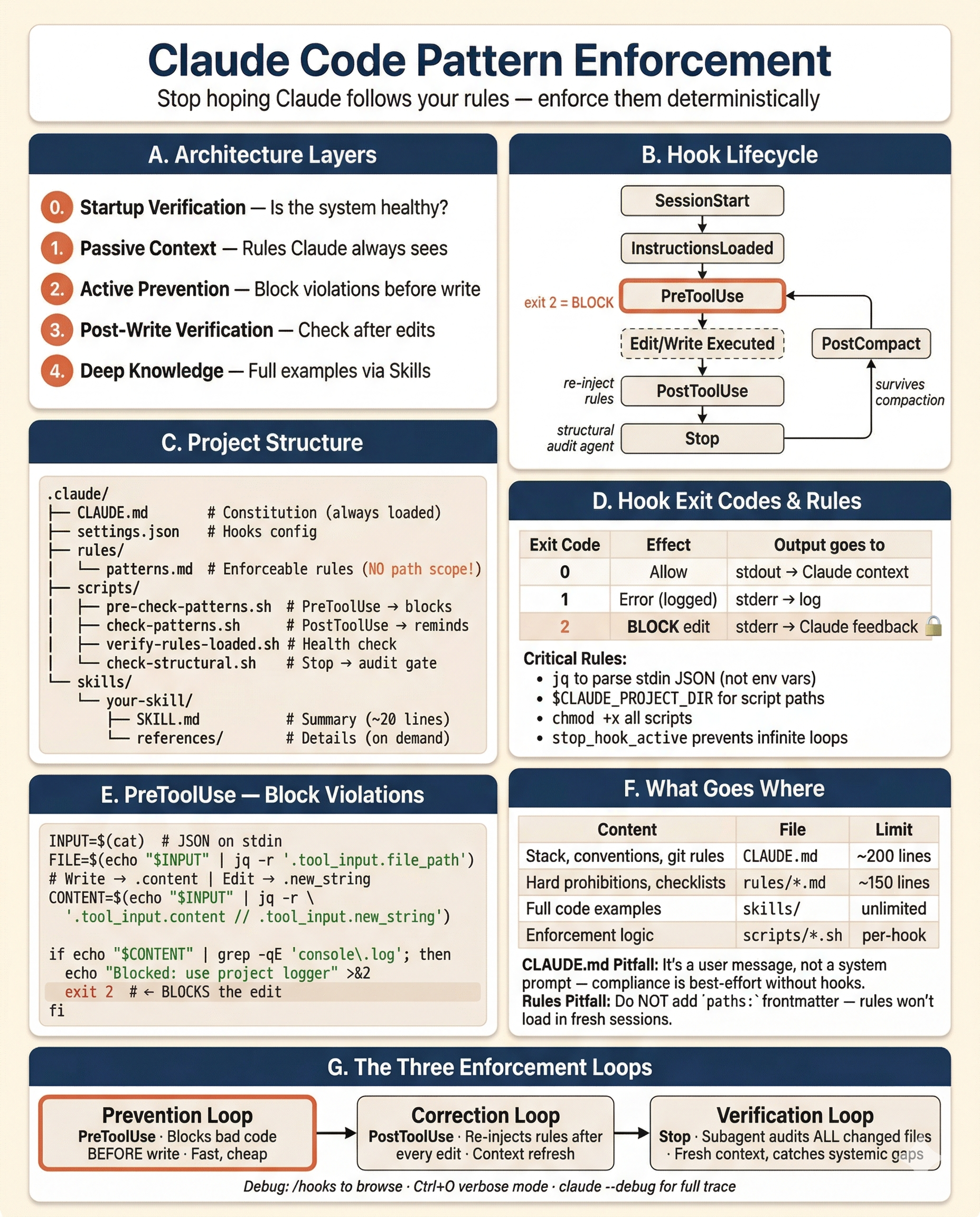
The system has four layers, each with a distinct role:
Layer 0: Startup Verification    — Is the compliance system itself healthy?
Layer 1: Passive Context         — What rules does Claude always see?
Layer 2: Active Prevention       — What violations are blocked before writing?
Layer 3: Post-Write Verification — What gets checked after edits and at session end?
Layer 4: Deep Knowledge (Skills) — Where are the full code examples?
These layers create three feedback loops:
- Prevention loop (PreToolUse) — Blocks bad code before it’s written. Fast, cheap, catches common violations.
- Correction loop (PostToolUse) — Re-injects rules after every edit. Gives Claude a reminder for the next edit.
- Verification loop (Stop) — Final structural audit by a subagent with fresh eyes. Catches systemic omissions.
File Structure
.claude/
├── CLAUDE.md                    # Project conventions (always loaded)
├── settings.json                # Hooks, permissions
├── settings.local.json          # Local permission overrides (gitignored)
├── rules/
│   └── your-patterns.md         # Mandatory pattern rules (NO path scope)
├── scripts/
│   ├── pre-check-patterns.sh    # PreToolUse: blocks violations before write
│   ├── check-patterns.sh        # PostToolUse: re-injects rules into context
│   ├── verify-rules-loaded.sh   # InstructionsLoaded: validates system health
│   └── check-structural.sh      # Stop: gates structural verification agent
├── skills/                      # Deep-dive reference knowledge
│   └── your-skill/
│       ├── SKILL.md             # Summary rules (loaded on invocation)
│       └── references/         # Detailed examples (loaded on demand)
│           └── 01-topic.md
└── commands/                    # User-invocable slash commands
    └── your-command.md
Step 1: Write CLAUDE.md (The Constitution)
CLAUDE.md is loaded on every single request, survives context compaction, and is the only file guaranteed to always be in context. Keep it under 200 lines (the official upper bound is ~500, but shorter is better — bloated CLAUDE.md files cause Claude to ignore your actual instructions).
What belongs here:
- Tech stack declaration
- Architecture rules (high-level boundaries)
- Import conventions (canonical paths)
- Code conventions (naming, patterns)
- Git workflow
- Testing commands
What does NOT belong here:
- Full code examples (use skills)
- Detailed per-pattern rules with checklists (use a rules file)
- Infrastructure implementation details (use skills)
Example structure:
# Project Name — Conventions

## Tech Stack

- [your stack here]

## Architecture Rules

- [module organization]
- [layer boundaries]
- [data flow]

## Import Rules

- Auth: `path/to/auth`
- Logger: `path/to/logger`
- Config: `path/to/config`

## Code Conventions

- [naming rules]
- [mandatory patterns]
- [prohibited patterns]

## Git Workflow

- Branch naming: `feature/TICKET-XXX-description`
- Commit format: conventional commits

## Testing

- Unit: `your-test-command`
- E2E: `your-e2e-command`
Key lesson: CLAUDE.md is delivered as a user message, not a system prompt. Claude reads it and tries to follow it, but compliance is not guaranteed. That’s why you need the other layers.
Step 2: Write Your Rules File (Enforceable Constraints)
Create .claude/rules/your-patterns.md — this is the comprehensive rulebook that hooks enforce against.
Critical: Do NOT Add Path Scope
# WRONG — this only loads when Claude reads a matching file

---

paths:

- "src/\*_/_.ts"

---

# RIGHT — no frontmatter, loads unconditionally at session start

# Your Pattern Rules

...
Path-scoped rules only load when Claude reads a file matching the glob. In a fresh session where Claude hasn’t read any source files (the most common case for “create something new”), the rules never load. This was the v1 failure. Remove path scope to make rules always-on.
Cost: Your rules file is loaded on every request. Keep it concise — one line per rule is ideal. Target 150–175 lines.
What to include:
1. Skill trigger table — Tell Claude which skill to invoke before implementing specific work:
## Skill triggers (MUST invoke via Skill tool before implementing)

- Creating/modifying models → invoke `data-modeling` skill
- Writing tests → invoke `testing` skill
- Adding logging/tracing → invoke `observability` skill
2. Per-file rules — Hard prohibitions that hooks can check:
## Per-file rules

- NEVER use debug print statements — use the project logger
- NEVER access environment variables directly — use the config service
- NEVER hardcode secrets, API keys, or credentials
- Route handlers have no try/catch, no logging, no business logic
3. Structural checklists — Co-creation requirements (“when you create X, you must also create Y”):
## When creating a new model:

1. Model/entity file in the designated directory
2. Export from barrel/index file
3. Repository/data-access layer in feature module
4. Register in module/app configuration
5. Database migration file
4. Infrastructure patterns — Canonical implementations for common patterns (webhooks, queues, auth, etc.)
Step 3: Set Up Hooks (Active Enforcement)
Hooks are configured in .claude/settings.json. They turn passive rules into active gates.
Important: All hook data is passed as JSON on stdin. Use jq to parse fields like tool_input.file_path. The only environment variable Claude Code sets for hooks is $CLAUDE_PROJECT_DIR (the project root). Use it to reference scripts reliably. All scripts must be executable — run chmod +x .claude/scripts/*.sh after creating them.
Hook JSON Structure
Every hook entry uses a nested format: an array of matcher groups, each containing a matcher regex and a hooks array of commands:
{
  "hooks": {
    "EventName": [
      {
        "matcher": "ToolPattern",
        "hooks": [
          {
            "type": "command",
            "command": "your-command-here",
            "timeout": 10
          }
        ]
      }
    ]
  }
}
The timeout field (in seconds) is optional but recommended. Default is 600s (10 minutes), which is too long for most hooks. Set 5s for quick checks, 15s for formatters, 30–60s for compilers/test runners.
Hook Lifecycle
SessionStart ──► InstructionsLoaded ──► [user interaction] ──► Stop
                                              │
                                    PreToolUse (before edit)
                                              │
                                    [Edit/Write executed]
                                              │
                                    PostToolUse (after edit)
                                              │
                                    PostCompact (after context compression)
This diagram shows the events used in this guide. Claude Code supports 20+ hook events including
UserPromptSubmit,PermissionRequest,SubagentStart/Stop,ConfigChange,PreCompact,SessionEnd, and more. See the Hooks reference for the complete list.
Debugging Hooks
- Run
/hooksin Claude Code to browse all configured hooks grouped by event - Press
Ctrl+Oto toggle verbose mode — hook output appears in the transcript - Run
claude --debugfor full execution details including exit codes
3a: SessionStart — Git Context
Give Claude situational awareness at session start:
{
  "hooks": {
    "SessionStart": [
      {
        "matcher": "",
        "hooks": [
          {
            "type": "command",
            "command": "echo '## Current Context'; echo \"Branch: $(git branch --show-current 2>/dev/null)\"; echo \"Last commit: $(git log -1 --oneline 2>/dev/null)\"; echo 'Uncommitted changes:'; git diff --stat 2>/dev/null | tail -5",
            "timeout": 10
          }
        ]
      }
    ]
  }
}
3b: InstructionsLoaded — Health Check
Verify the compliance system itself is working:
#!/bin/bash
# .claude/scripts/verify-rules-loaded.sh

RULES_FILE=".claude/rules/your-patterns.md"
SKILLS_DIR=".claude/skills"

WARNINGS=""

# 1. Verify rules file exists and is non-empty
if [ ! -f "$RULES_FILE" ]; then
  WARNINGS="${WARNINGS}CRITICAL: $RULES_FILE is missing. Pattern compliance hooks are non-functional.\n"
elif [ ! -s "$RULES_FILE" ]; then
  WARNINGS="${WARNINGS}CRITICAL: $RULES_FILE is empty. Pattern compliance hooks have no rules to check.\n"
fi

# 2. Verify check-patterns.sh exists and is executable
if [ ! -x ".claude/scripts/check-patterns.sh" ]; then
  WARNINGS="${WARNINGS}WARNING: .claude/scripts/check-patterns.sh is missing or not executable. PostToolUse verification disabled.\n"
fi

# 3. Count auto-invocable skills (those without disable-model-invocation: true)
AUTO_SKILLS=0
TOTAL_SKILLS=0
for skill_file in "$SKILLS_DIR"/*/SKILL.md; do
  [ -f "$skill_file" ] || continue
  TOTAL_SKILLS=$((TOTAL_SKILLS + 1))
  if ! grep -q 'disable-model-invocation:\s*true' "$skill_file" 2>/dev/null; then
    AUTO_SKILLS=$((AUTO_SKILLS + 1))
  fi
done

if [ "$AUTO_SKILLS" -gt 10 ]; then
  WARNINGS="${WARNINGS}WARNING: ${AUTO_SKILLS} auto-invocable skills detected (of ${TOTAL_SKILLS} total). Skill descriptions may exceed context budget. Run /context to check for excluded skills.\n"
fi

# Output
if [ -n "$WARNINGS" ]; then
  echo "## Pattern Compliance System Status"
  echo ""
  echo -e "$WARNINGS"
  echo "Run /context to verify all rules files are loaded."
fi

exit 0
{
"hooks": {
"InstructionsLoaded": [
{
"matcher": "session_start",
"hooks": [
{
"type": "command",
"command": "bash \"$CLAUDE_PROJECT_DIR\"/.claude/scripts/verify-rules-loaded.sh",
"timeout": 5
}
]
}
]
}
}Why this matters: In v2, the rules file was deleted and nobody noticed. Both hooks that depended on it silently degraded. This hook makes that failure visible immediately.
3c: PreToolUse — Block Violations Before Write
This is the most important enforcement hook. It inspects proposed content and blocks the edit if it contains critical violations (exit code 2 = block).
#!/bin/bash
# .claude/scripts/pre-check-patterns.sh

# Read tool input from stdin (Claude Code passes JSON)
INPUT=$(cat)
TOOL=$(echo "$INPUT" | jq -r '.tool_name // empty')
FILE=$(echo "$INPUT" | jq -r '.tool_input.file_path // empty')

# ── Configure for your stack ──────────────────────────────────
SOURCE_EXT='\.(ts|tsx)$'              # Python: \.py$   Go: \.go$   Ruby: \.rb$   Java: \.java$
TEST_PATTERN='\.(spec|test)\.(ts|tsx)$' # Python: (_test|test_)\.py$   Go: _test\.go$
SKIP_GENERATED='\.d\.ts$'            # Go: \.pb\.go$   (remove line if N/A)
COMMENT_PREFIX='^\s*(//|\*)'         # Python/Ruby: ^\s*#   Lua: ^\s*--
# ──────────────────────────────────────────────────────────────

# Skip files outside your source language
if ! echo "$FILE" | grep -qE "$SOURCE_EXT"; then exit 0; fi

# Skip test files
if echo "$FILE" | grep -qE "$TEST_PATTERN"; then exit 0; fi

# Skip generated files (remove if not applicable)
if [ -n "$SKIP_GENERATED" ] && echo "$FILE" | grep -qE "$SKIP_GENERATED"; then exit 0; fi

# Get the content being written — Edit uses new_string, Write uses content
if [ "$TOOL" = "Write" ]; then
  CONTENT=$(echo "$INPUT" | jq -r '.tool_input.content // empty')
elif [ "$TOOL" = "Edit" ]; then
  CONTENT=$(echo "$INPUT" | jq -r '.tool_input.new_string // empty')
else
  exit 0
fi

# Exit early if no content to check
if [ -z "$CONTENT" ]; then exit 0; fi

VIOLATIONS=""

# ── Add your project's critical checks below ──────────────────
# Each check: filter out comments, grep for the violation pattern.
# Only check unambiguous violations that never have valid exceptions.

# Example: ban debug print statements
# TypeScript: console.log   Python: print(   Go: fmt.Print   Java: System.out.print
if echo "$CONTENT" | grep -vE "$COMMENT_PREFIX" | grep -qE 'console\.(log|warn|error|debug|info)\s*\('; then
  VIOLATIONS="${VIOLATIONS}\n  - Uses debug print statement (use project logger)"
fi

# Example: ban direct environment variable access
# TypeScript: process.env   Python: os.environ/os.getenv   Go: os.Getenv
if echo "$CONTENT" | grep -vE "$COMMENT_PREFIX" | grep -qE 'process\.env\b'; then
  VIOLATIONS="${VIOLATIONS}\n  - Uses direct env access (use config service)"
fi

# Add your own stack-specific checks:
# if echo "$CONTENT" | grep -vE "$COMMENT_PREFIX" | grep -qE 'your_pattern'; then
#   VIOLATIONS="${VIOLATIONS}\n  - Description of violation"
# fi
# ──────────────────────────────────────────────────────────────

if [ -n "$VIOLATIONS" ]; then
  echo -e "Blocked: Critical pattern violations in ${FILE}:${VIOLATIONS}" >&2
  exit 2  # Exit 2 = block the edit
fi

exit 0
{
"hooks": {
"PreToolUse": [
{
"matcher": "Edit|Write",
"hooks": [
{
"type": "command",
"command": "bash \"$CLAUDE_PROJECT_DIR\"/.claude/scripts/pre-check-patterns.sh",
"timeout": 5
}
]
}
]
}
}Key detail: The Edit tool sends the replacement text in tool_input.new_string, while Write sends the full file in tool_input.content. Your script must handle both — check the tool_name field to know which one to parse.
Why PreToolUse, not PostToolUse: PostToolUse fires after the file is written — it cannot undo the action. PreToolUse fires before the edit and can block it. Prevention, not feedback.
Scope carefully: Only check critical, unambiguous violations that never have valid exceptions. Regex-based checks produce false positives — exclude comments and keep patterns tight.
3d: PostToolUse — Re-inject Rules After Every Edit
After each file edit, re-output the rules into Claude’s context as a reminder:
#!/bin/bash
# .claude/scripts/check-patterns.sh

INPUT=$(cat)
FILE=$(echo "$INPUT" | jq -r '.tool_input.file_path // empty')

# ── Configure for your stack (same as pre-check-patterns.sh) ──
SOURCE_EXT='\.(ts|tsx)$'
TEST_PATTERN='\.(spec|test)\.(ts|tsx)$'
# ──────────────────────────────────────────────────────────────

# Skip files outside your source language
if ! echo "$FILE" | grep -qE "$SOURCE_EXT"; then exit 0; fi

# Skip test files
if echo "$FILE" | grep -qE "$TEST_PATTERN"; then exit 0; fi

# Output rules content directly — PostToolUse stdout is added to Claude's context
echo "## Pattern rules to check ${FILE} against:"
cat .claude/rules/your-patterns.md 2>/dev/null || echo 'rules file not found'
{
"hooks": {
"PostToolUse": [
{
"matcher": "Edit|Write",
"hooks": [
{
"type": "command",
"command": "bash \"$CLAUDE_PROJECT_DIR\"/.claude/scripts/check-patterns.sh",
"timeout": 5
}
]
}
]
}
}Why this matters: After a file edit, Claude’s context may have drifted. This hook forces the full rulebook back into Claude’s attention, ensuring the next edit still follows all rules.
3e: PostToolUse — Auto-Format and Auto-Fix
Add formatting and linting hooks so Claude doesn’t need to think about style. Note: hook data arrives on stdin as JSON — parse the file path with jq:
{
  "hooks": {
    "PostToolUse": [
      {
        "matcher": "Edit|Write",
        "hooks": [
          {
            "type": "command",
            "command": "FILE=$(cat | jq -r '.tool_input.file_path // empty'); [ -f \"$FILE\" ] && your-formatter \"$FILE\" 2>/dev/null; exit 0",
            "timeout": 15
          }
        ]
      },
      {
        "matcher": "Edit|Write",
        "hooks": [
          {
            "type": "command",
            "command": "INPUT=$(cat); FILE=$(echo \"$INPUT\" | jq -r '.tool_input.file_path // empty'); if echo \"$FILE\" | grep -qE '\\.(ts|tsx|py|go)$'; then your-linter --fix \"$FILE\" 2>&1 | tail -10; fi; exit 0",
            "timeout": 15
          }
        ]
      }
    ]
  }
}
Common formatters/linters by stack: npx prettier + npx eslint (JS/TS), black + ruff (Python), gofmt + golangci-lint (Go), rubocop (Ruby).
3f: PostToolUse — Run Related Tests
Give Claude immediate test feedback. This runs the test if the edited file IS a test file:
{
  "hooks": {
    "PostToolUse": [
      {
        "matcher": "Edit|Write",
        "hooks": [
          {
            "type": "command",
            "command": "INPUT=$(cat); FILE=$(echo \"$INPUT\" | jq -r '.tool_input.file_path // empty'); if echo \"$FILE\" | grep -qE '\\.(spec|test)\\.(ts|tsx)$'; then your-test-runner \"$FILE\" 2>&1 | tail -20; fi; exit 0",
            "timeout": 60
          }
        ]
      }
    ]
  }
}
And this runs the co-located test when a source file is edited (adapt the path convention for your project):
{
  "hooks": {
    "PostToolUse": [
      {
        "matcher": "Edit|Write",
        "hooks": [
          {
            "type": "command",
            "command": "INPUT=$(cat); FILE=$(echo \"$INPUT\" | jq -r '.tool_input.file_path // empty'); if echo \"$FILE\" | grep -qE '\\.(ts|tsx)$' && ! echo \"$FILE\" | grep -qE '\\.(spec|test)\\.(ts|tsx)$'; then DIR=$(dirname \"$FILE\"); BASE=$(basename \"$FILE\"); SPEC=\"$DIR/_spec/${BASE%.*}.spec.${BASE##*.}\"; if [ -f \"$SPEC\" ]; then your-test-runner \"$SPEC\" 2>&1 | tail -20; fi; fi; exit 0",
            "timeout": 60
          }
        ]
      }
    ]
  }
}
Common test runners: npx jest (JS/TS), pytest (Python), go test (Go), rspec (Ruby). The co-located test hook assumes a specific directory layout — adjust the path resolution for your project’s test file convention.
3g: PostCompact — Survive Context Compression
When Claude compresses context, rules can be lost. Re-inject them:
{
  "hooks": {
    "PostCompact": [
      {
        "matcher": "",
        "hooks": [
          {
            "type": "command",
            "command": "echo '## Pattern rules still active after compaction:'; cat .claude/rules/your-patterns.md 2>/dev/null || echo 'Rules file not found'",
            "timeout": 5
          }
        ]
      }
    ]
  }
}
CLAUDE.md survives compaction automatically (Claude re-reads it from disk). This hook is belt-and-suspenders for the rules file.
Note: The official docs show
SessionStartwithcompactmatcher for this use case.PostCompactis a dedicated event that fires specifically after compaction completes — it is more semantically correct and also supportsmanual/automatchers to distinguish user-triggered/compactfrom auto-compaction.
3h: Stop — Structural Verification Agent
The final quality gate. A subagent with fresh context checks all changed files against the structural rules:
#!/bin/bash
# .claude/scripts/check-structural.sh

# ── Configure for your stack ──────────────────────────────────
SOURCE_EXT='\.(ts|tsx)$'   # Python: \.py$   Go: \.go$
# ──────────────────────────────────────────────────────────────

# Parse stop_hook_active from JSON stdin to prevent infinite loops
INPUT=$(cat)
if echo "$INPUT" | jq -e '.stop_hook_active' 2>/dev/null | grep -q true; then
  exit 0
fi

# Only fire if source files were changed
if ! git diff --name-only HEAD 2>/dev/null | grep -qE "$SOURCE_EXT"; then
  exit 0
fi

echo "source_files_changed"
Critical detail: The stop_hook_active field is passed in the JSON stdin, NOT as an environment variable. You must parse it with jq. If you check it as a shell variable, the infinite-loop guard won’t work.
{
  "hooks": {
    "Stop": [
      {
        "matcher": "",
        "hooks": [
          {
            "type": "command",
            "command": "bash \"$CLAUDE_PROJECT_DIR\"/.claude/scripts/check-structural.sh",
            "timeout": 5
          },
          {
            "type": "agent",
            "prompt": "Run `git diff --name-only HEAD` to find changed source files. Read .claude/rules/your-patterns.md for the structural rules. Read each changed file. Check each file against the structural checklists in the rules. Return ok: true if all pass, or ok: false with specific violations.",
            "timeout": 60
          }
        ]
      }
    ]
  }
}
Why Stop, not PostToolUse: Running structural checks after every file write produces false positives from intermediate states (entity written, agent complains “missing repository,” then repository is created next). Stop runs once after Claude finishes all writes — if something is missing at that point, it’s a real violation.
Caveat: Stop hooks fire whenever Claude finishes responding, not only at task completion. They do not fire on user interrupts. API errors fire the separate StopFailure event instead.
3i: PreToolUse — Safety Guards
Protect branches, sensitive files, and dangerous commands:
{
  "hooks": {
    "PreToolUse": [
      {
        "matcher": "Edit|Write",
        "hooks": [
          {
            "type": "command",
            "command": "[ \"$(git branch --show-current)\" != \"main\" ] || { echo 'Cannot edit on main branch' >&2; exit 2; }",
            "timeout": 5
          }
        ]
      },
      {
        "matcher": "Edit|Write",
        "hooks": [
          {
            "type": "command",
            "command": "INPUT=$(cat); FILE=$(echo \"$INPUT\" | jq -r '.tool_input.file_path // empty'); if echo \"$FILE\" | grep -qE '(\\.env$|\\.env\\.)'; then echo \"Protected file: $FILE\" >&2; exit 2; fi; if echo \"$FILE\" | grep -qE 'settings\\.json$' && ! echo \"$FILE\" | grep -qE '/\\.claude/'; then echo \"Protected file: $FILE\" >&2; exit 2; fi; exit 0",
            "timeout": 5
          }
        ]
      },
      {
        "matcher": "Bash",
        "hooks": [
          {
            "type": "command",
            "command": "INPUT=$(cat); CMD=$(echo \"$INPUT\" | jq -r '.tool_input.command'); if echo \"$CMD\" | grep -qE '(rm -rf /|drop table|DROP DATABASE|truncate table|force push|--force|git reset --hard|git checkout \\.|git clean)'; then echo 'Blocked: dangerous command' >&2; exit 2; fi; exit 0",
            "timeout": 5
          }
        ]
      }
    ]
  }
}
Note on exit codes: Exit 2 blocks the action. Write the reason to stderr (>&2), and Claude receives it as feedback explaining why the edit was blocked. Exit 0 lets the action proceed — stdout from exit-0 hooks is added to Claude’s context.
Step 4: Create Skills (Deep Knowledge)
Skills are structured reference documents that Claude loads on-demand when it needs implementation details. They solve the context budget problem: your rules file says WHAT to do, skills show HOW.
When You Need Skills
If your entire pattern system (rules + code examples) fits in <200 lines, you don’t need skills — put everything in CLAUDE.md. If it doesn’t (most real projects), skills let you lazy-load the details.
Skill Structure
.claude/skills/
└── your-skill/
    ├── SKILL.md                 # Summary rules (loaded when skill is invoked)
    └── references/             # Detailed examples (loaded on demand)
        ├── 01-service-pattern.md
        └── 02-repository-pattern.md
SKILL.md format:
---
name: your-skill
description: One-line description used for matching
---

# Skill Title

## Summary Rules

- Rule 1 (concise)
- Rule 2 (concise)

## Reference Files

- references/01-service-pattern.md — full transaction + audit example
- references/02-repository-pattern.md — full repository with tracing
Two-Tier Loading
- SKILL.md loads when the skill is invoked — summary rules, ~20 lines
- references/ load on demand when Claude needs the full example — ~100+ lines each
This manages context budget. Claude gets the rules first, details only when needed.
Invocation Modes
| Mode | Reliability | How it works |
|---|---|---|
| Auto-invocation | Probabilistic | Claude reads skill descriptions and decides to load when relevant |
| Preloaded in agents | Deterministic | skills: skill-a, skill-b in command frontmatter injects at launch |
| Manual | Deterministic | User or rules trigger via Skill tool |
Auto-invocation is not guaranteed. In testing, Claude sometimes skipped auto-invocation and read source files directly instead. The rules file (always loaded) is the safety net — it tells Claude WHAT to do even if skills don’t load to show HOW.
Do not create an always-on “use skills” routing directive. In production testing, a rules file that nudged Claude to “read skill files before implementing” triggered 100k+ token Explore agents reading all skill references — far exceeding the compliance value. The rules file already tells Claude WHAT to do, the PreToolUse hook blocks critical violations, and the Stop agent catches everything else.
Context Budget
Skill descriptions consume ~2% of the context window (fallback: 16,000 characters). With 7-8 auto-invocable skills, this is safe. Beyond 10, descriptions may be silently excluded. The InstructionsLoaded hook warns when the count is high. Run /context to check for excluded skills.
To override the limit, set the SLASH_COMMAND_TOOL_CHAR_BUDGET environment variable.
Cross-Referencing Skills
Skills should reference each other to prevent duplication:
## Related Skills

- For error handling patterns → see `error-handling` skill
- For testing this pattern → see `testing` skill
Controlling Invocation
Use frontmatter fields to control who can invoke a skill:
| Frontmatter | You can invoke | Claude can invoke | When loaded into context |
|---|---|---|---|
| (default) | Yes | Yes | Description always in context, full skill loads when invoked |
disable-model-invocation: true | Yes | No | Description not in context, full skill loads when you invoke |
user-invocable: false | No | Yes | Description always in context, full skill loads when invoked |
Use disable-model-invocation: true for workflows with side effects (deploy, scaffold, send messages). Use user-invocable: false for background knowledge users shouldn’t invoke directly.
Skills also support a hooks frontmatter field for hooks scoped to the skill’s lifecycle, and a model field to override the model when the skill is active.
Step 5: Create User-Invocable Workflows
Commands and skills have been merged in Claude Code. A file at .claude/commands/deploy.md and a skill at .claude/skills/deploy/SKILL.md both create /deploy and work the same way. Skills are recommended for new work since they support additional features like supporting files, frontmatter control, and scoped hooks. Existing .claude/commands/ files continue to work.
Create a skill with disable-model-invocation: true for workflows you want to trigger manually:
## <!-- .claude/skills/review/SKILL.md -->

name: review
description: Review changed code for pattern violations
disable-model-invocation: true

---

You are a REVIEW instance. Review the changed code for:

1. Pattern violations against .claude/rules/your-patterns.md
2. Missing structural companions (model without migration, etc.)
3. Hardcoded values that should come from config

Scope: $ARGUMENTS

Read each changed file. For each violation, cite the file, line, and which rule is broken.
$ARGUMENTS is replaced with whatever the user types after the command: /review "auth module".
Workflow Design Patterns
- Role assignment — Tell Claude what kind of instance it is (planner, builder, reviewer)
- Constraint scoping — Define exactly what to check and what to ignore
- Output format — Specify the expected output structure
- Agent spawning — Use
context: fork+agent: general-purposefor workflows that should run in isolated context
Step 6: Configure Permissions
Lock down what Claude can run:
{
  "permissions": {
    "allow": [
      "Read",
      "Glob",
      "Grep",
      "Edit .claude/**",
      "Write .claude/**",
      "Bash(your-test-runner *)",
      "Bash(your-formatter *)",
      "Bash(your-linter *)",
      "Bash(your-type-checker *)",
      "Bash(git *)"
    ],
    "deny": ["Bash(rm -rf *)", "Bash(* --force *)"]
  }
}
Adapt the allow list for your stack: npx jest/prettier/eslint/tsc (JS/TS), pytest/black/ruff/mypy (Python), go test/gofmt/golangci-lint (Go), etc.
Use settings.local.json (gitignored) for developer-specific overrides.
Permission rule syntax: The trailing * enables prefix matching, so Bash(git diff *) allows any command starting with git diff. The space before * is important: without it, Bash(git diff*) would also match git diff-index.
Complete settings.json Example
This combines all hooks from the guide into one file, matching the nested format required by Claude Code:
{
  "hooks": {
    "SessionStart": [
      {
        "matcher": "",
        "hooks": [
          {
            "type": "command",
            "command": "echo '## Current Context'; echo \"Branch: $(git branch --show-current 2>/dev/null)\"; echo \"Last commit: $(git log -1 --oneline 2>/dev/null)\"; echo 'Uncommitted changes:'; git diff --stat 2>/dev/null | tail -5",
            "timeout": 10
          }
        ]
      }
    ],
    "InstructionsLoaded": [
      {
        "matcher": "session_start",
        "hooks": [
          {
            "type": "command",
            "command": "bash \"$CLAUDE_PROJECT_DIR\"/.claude/scripts/verify-rules-loaded.sh",
            "timeout": 5
          }
        ]
      }
    ],
    "PreToolUse": [
      {
        "matcher": "Edit|Write",
        "hooks": [
          {
            "type": "command",
            "command": "[ \"$(git branch --show-current)\" != \"main\" ] || { echo 'Cannot edit on main branch' >&2; exit 2; }",
            "timeout": 5
          }
        ]
      },
      {
        "matcher": "Edit|Write",
        "hooks": [
          {
            "type": "command",
            "command": "INPUT=$(cat); FILE=$(echo \"$INPUT\" | jq -r '.tool_input.file_path // empty'); if echo \"$FILE\" | grep -qE '(\\.env$|\\.env\\.)'; then echo \"Protected file: $FILE\" >&2; exit 2; fi; if echo \"$FILE\" | grep -qE 'settings\\.json$' && ! echo \"$FILE\" | grep -qE '/\\.claude/'; then echo \"Protected file: $FILE\" >&2; exit 2; fi; exit 0",
            "timeout": 5
          }
        ]
      },
      {
        "matcher": "Edit|Write",
        "hooks": [
          {
            "type": "command",
            "command": "bash \"$CLAUDE_PROJECT_DIR\"/.claude/scripts/pre-check-patterns.sh",
            "timeout": 5
          }
        ]
      },
      {
        "matcher": "Bash",
        "hooks": [
          {
            "type": "command",
            "command": "INPUT=$(cat); CMD=$(echo \"$INPUT\" | jq -r '.tool_input.command'); if echo \"$CMD\" | grep -qE '(rm -rf /|drop table|DROP DATABASE|truncate table|force push|--force|git reset --hard|git checkout \\.|git clean)'; then echo 'Blocked: dangerous command' >&2; exit 2; fi; exit 0",
            "timeout": 5
          }
        ]
      }
    ],
    "PostToolUse": [
      {
        "matcher": "Edit|Write",
        "hooks": [
          {
            "type": "command",
            "command": "FILE=$(cat | jq -r '.tool_input.file_path // empty'); [ -f \"$FILE\" ] && your-formatter \"$FILE\" 2>/dev/null; exit 0",
            "timeout": 15
          }
        ]
      },
      {
        "matcher": "Edit|Write",
        "hooks": [
          {
            "type": "command",
            "command": "INPUT=$(cat); FILE=$(echo \"$INPUT\" | jq -r '.tool_input.file_path // empty'); if echo \"$FILE\" | grep -qE '\\.(ts|tsx|py|go)$'; then your-linter --fix \"$FILE\" 2>&1 | tail -10; fi; exit 0",
            "timeout": 15
          }
        ]
      },
      {
        "matcher": "Edit|Write",
        "hooks": [
          {
            "type": "command",
            "command": "INPUT=$(cat); FILE=$(echo \"$INPUT\" | jq -r '.tool_input.file_path // empty'); if echo \"$FILE\" | grep -qE '\\.(spec|test)\\.(ts|tsx)$'; then your-test-runner \"$FILE\" 2>&1 | tail -20; fi; exit 0",
            "timeout": 60
          }
        ]
      },
      {
        "matcher": "Edit|Write",
        "hooks": [
          {
            "type": "command",
            "command": "INPUT=$(cat); FILE=$(echo \"$INPUT\" | jq -r '.tool_input.file_path // empty'); if echo \"$FILE\" | grep -qE '\\.(ts|tsx)$' && ! echo \"$FILE\" | grep -qE '\\.(spec|test)\\.(ts|tsx)$'; then DIR=$(dirname \"$FILE\"); BASE=$(basename \"$FILE\"); SPEC=\"$DIR/_spec/${BASE%.*}.spec.${BASE##*.}\"; if [ -f \"$SPEC\" ]; then your-test-runner \"$SPEC\" 2>&1 | tail -20; fi; fi; exit 0",
            "timeout": 60
          }
        ]
      },
      {
        "matcher": "Write",
        "hooks": [
          {
            "type": "command",
            "command": "INPUT=$(cat); FILE=$(echo \"$INPUT\" | jq -r '.tool_input.file_path // empty'); if echo \"$FILE\" | grep -qE '\\.(ts|tsx|py|go)$'; then your-type-checker 2>&1 | head -20; fi; exit 0",
            "timeout": 30
          }
        ]
      },
      {
        "matcher": "Edit|Write",
        "hooks": [
          {
            "type": "command",
            "command": "bash \"$CLAUDE_PROJECT_DIR\"/.claude/scripts/check-patterns.sh",
            "timeout": 5
          }
        ]
      }
    ],
    "PostCompact": [
      {
        "matcher": "",
        "hooks": [
          {
            "type": "command",
            "command": "echo '## Pattern rules still active after compaction:'; cat .claude/rules/your-patterns.md 2>/dev/null || echo 'Rules file not found'",
            "timeout": 5
          }
        ]
      }
    ],
    "Stop": [
      {
        "matcher": "",
        "hooks": [
          {
            "type": "command",
            "command": "INPUT=$(cat); if echo \"$INPUT\" | jq -e '.stop_hook_active' | grep -q true; then exit 0; fi; cd \"$(git rev-parse --show-toplevel 2>/dev/null || echo .)\" && your-type-checker 2>&1 | head -10 || true",
            "timeout": 30
          }
        ]
      },
      {
        "matcher": "",
        "hooks": [
          {
            "type": "command",
            "command": "bash \"$CLAUDE_PROJECT_DIR\"/.claude/scripts/check-structural.sh",
            "timeout": 5
          },
          {
            "type": "agent",
            "prompt": "Run `git diff --name-only HEAD` to find changed source files. Read .claude/rules/your-patterns.md for the structural rules. Read each changed file. Check each file against the structural checklists. Return ok: true if all pass, or ok: false with specific violations.",
            "timeout": 60,
            "statusMessage": "Verifying structural completeness..."
          }
        ]
      }
    ],
    "Notification": [
      {
        "matcher": "",
        "hooks": [
          {
            "type": "command",
            "command": "osascript -e 'display notification \"Claude needs your attention\" with title \"Claude Code\"' 2>/dev/null; exit 0",
            "timeout": 5
          }
        ]
      }
    ]
  }
}
Replace your-formatter, your-linter, your-test-runner, and your-type-checker with your stack’s actual commands. The file extension patterns in grep filters should also match your source language. Everything else (hook structure, event types, exit codes, JSON parsing) is stack-agnostic.
Non-Interactive / CI Invocations
For claude -p invocations where compliance is critical, place rules at the system prompt level and scope tool permissions with --allowedTools:
claude -p "implement the notifications module" \
  --append-system-prompt "$(cat .claude/rules/your-patterns.md)" \
  --allowedTools "Read,Edit,Write,Glob,Grep,Bash(your-test-runner *),Bash(git *)"
--append-system-prompt is stronger than CLAUDE.md (user message level). --allowedTools scopes which tools Claude can use without prompting — critical for unattended CI safety. Use this for:
- CI pipelines that generate code
- Batch operations
- Automated scaffolding
Note: Both flags must be passed on every invocation — they do not persist across sessions. User-invoked skills like /commit and built-in commands are only available in interactive mode — in -p mode, describe the task you want to accomplish instead. The CLI was previously called “headless mode”; the -p flag works the same way.
Other Hook Types
Beyond command hooks (type: "command"), Claude Code supports three additional hook types:
Prompt-Based Hooks
For decisions that require judgment rather than deterministic rules. A Claude model (Haiku by default) evaluates the hook and returns ok: true/false:
{
  "hooks": {
    "Stop": [
      {
        "matcher": "",
        "hooks": [
          {
            "type": "prompt",
            "prompt": "Check if all requested tasks are complete. If not, respond with what remains to be done."
          }
        ]
      }
    ]
  }
}
Agent-Based Hooks
When verification requires inspecting files or running commands. Spawns a subagent with tool access (up to 50 tool-use turns):
{
  "hooks": {
    "Stop": [
      {
        "matcher": "",
        "hooks": [
          {
            "type": "agent",
            "prompt": "Verify that all unit tests pass. Run the test suite and check the results.",
            "timeout": 120
          }
        ]
      }
    ]
  }
}
HTTP Hooks
POST event data to an HTTP endpoint instead of running a shell command:
{
  "hooks": {
    "PostToolUse": [
      {
        "matcher": "",
        "hooks": [
          {
            "type": "http",
            "url": "http://localhost:8080/hooks/tool-use",
            "timeout": 10
          }
        ]
      }
    ]
  }
}
Maintenance Model
| What changed | Where to edit | How it propagates |
|---|---|---|
| Any pattern rule | rules/your-patterns.md | Automatic — hooks read the file from disk |
| Critical violation check | scripts/pre-check-patterns.sh | Immediate — PreToolUse reads it on every edit |
| Code example | Relevant skill reference file | On-demand — via auto-invocation or preloading |
| Hook behavior | settings.json | That hook only |
Rules for Maintaining the System
- Never delete the rules file — it’s the single source of truth. The startup hook will warn, but all verification degrades.
- Never add path scope to the rules file — this was the v1 failure. It must load unconditionally.
- Never inline JSON construction in settings.json — use external scripts. Inline bash JSON breaks on quotes and newlines.
- Never duplicate rules in hook prompts — hooks should read the file. One source of truth.
- Never duplicate rules in the PostCompact hook — the hook should
catthe file from disk. - Never create an always-on “use skills” routing directive — it triggers expensive skill exploration (100k+ tokens) for minimal compliance benefit.
What Will Break the System
| Failure | Impact | Mitigation |
|---|---|---|
| Rules file deleted | All detailed rules lost, only CLAUDE.md remains | InstructionsLoaded hook warns |
| Path scope re-added to rules | Fresh sessions get no rules | Don’t do this (v1 failure) |
pre-check-patterns.sh deleted | Critical violations no longer blocked before write | InstructionsLoaded hook warns |
| Agent hook timeout (60s) | Structural violations pass unchecked | PreToolUse still catches per-file violations |
| >10 auto-invocable skills | Skill descriptions silently excluded from context | InstructionsLoaded hook warns |
| Context compression | Rules may be lost from context | PostCompact hook re-injects them |
Reliability Matrix
| Mechanism | Loads when | Reliability |
|---|---|---|
| CLAUDE.md | Every session, every request | Always present |
| Rules file (no path scope) | Every session, unconditionally | Always present |
| Rules file (with path scope) | When Claude reads a matching file | NOT reliable for fresh sessions |
| Skills (auto-invocation) | When description matching triggers | Probabilistic |
| Skills (preloaded in agents) | When subagent with skills: is spawned | Deterministic |
| PreToolUse hook | Before every Edit/Write | Deterministic, can block |
| PostToolUse hook | After every Edit/Write | Deterministic, feedback only |
| Stop agent hook | When Claude finishes responding | Deterministic, can verify |
| PostCompact hook | After context compression | Deterministic |
| InstructionsLoaded hook | When rules load at session start | Deterministic |
Invocation Path Verification
Every invocation path should have full coverage. Verify yours:
| Invocation | CLAUDE.md | Rules (no path scope) | PreToolUse | Stop agent | Skills |
|---|---|---|---|---|---|
| Fresh session, no files open | ✅ always | ✅ always | ✅ blocks | ✅ verifies | ⚠️ probabilistic |
| Direct edit (“add a method”) | ✅ | ✅ | ✅ | ✅ | ⚠️ probabilistic |
| Slash command with skills | ✅ | ✅ | ✅ | ✅ | ✅ preloaded |
Headless claude -p | ✅ | ✅ | ✅ | ✅ | ❌ none |
| Post-compaction | ✅ | ✅ (re-loads) | ✅ | ✅ | ❌ lost |
Key check: The “fresh session, no files open” row works only if the rules file has no path scope. If every row shows ✅ for PreToolUse and Stop, your enforcement has no gaps.
Design Principles
- Defense in depth — Multiple layers catch violations. PreToolUse blocks before write, PostToolUse reminds after, Stop verifies at session end.
- Context persistence — Rules survive context compression via PostCompact re-injection and PostToolUse re-injection after every edit.
- Separation of concerns — CLAUDE.md = philosophy. Rules = enforceable constraints. Skills = deep knowledge. Hooks = enforcement. Commands = user workflows.
- Lazy loading — Skills load summary rules first, deep references on demand. Manages context budget.
- Fresh-eyes verification — Stop hooks use a subagent with independent context to audit changes. No self-grading.
- Fail-fast — InstructionsLoaded validates the enforcement infrastructure itself. If rules are missing, you know immediately.
- Prevention over correction — PreToolUse hooks prevent bad writes rather than detecting them after the fact.
- Single source of truth — Rules live in one file. Hooks read that file. Nothing is duplicated.
Quick Start Checklist
- Write
CLAUDE.mdwith high-level conventions (<200 lines) - Write
rules/your-patterns.mdwith detailed rules (no path scope, ~150 lines) - Create
scripts/pre-check-patterns.shfor critical violation blocking - Create
scripts/check-patterns.shfor post-edit rule re-injection - Create
scripts/verify-rules-loaded.shfor startup health checks - Create
scripts/check-structural.shfor stop-hook gating - Configure
settings.jsonwith all hooks (use nested format!) - Make all scripts executable (
chmod +x .claude/scripts/*.sh) - Install
jq(brew install jq/apt-get install jq) — required for JSON parsing in hooks - Create skills for patterns that need full code examples
- Create commands for repeatable user workflows
- Test: fresh session, no files open — rules should load
- Test: write code with a violation — PreToolUse should block
- Test: complete a session with structural omissions — Stop agent should catch them
- Run
/hooksto verify all hooks appear under the correct events